

I bought the JZCreater USB desk fan back in January mostly as an afterthought, tossed it in an Amazon cart with a stack of cable clips because it was under ten bucks and I figured it couldn't hurt. I run my home office out of a converted section of my garage, no central air out there, just a space heater in winter and whatever the ceiling fan can manage in summer. By the time June rolled around and the garage started climbing past 90 degrees most afternoons, that ten dollar fan had turned into the single piece of gear I reach for the most on my desk, more than my monitor light, more than my keyboard wrist rest.
Six months of near-daily use later, running eight to ten hours a day most weekdays, I've got a real sense of where this thing earns its keep and where it falls short. Short version, for the price it's one of the easiest recommendations I've made for this site. But it's a small fan doing a small fan's job, and if you go in expecting it to cool a whole room, you're going to be disappointed.
The Quick Verdict
A genuinely useful personal cooling fix for a hot desk, as long as you understand it's built for your face and hands, not your whole office.
Amazon Check Today's Price →Sweating through afternoon calls because your home office has no AC where you sit?
The JZCreater fan plugs straight into a USB port or wall adapter and puts a direct line of cool air right where you're sitting, no installation, no noise complaints from the next room.
Amazon Check Today's Price on Amazon →How I've Used It
It sits about eight inches to the left of my keyboard, plugged into a powered USB hub that also runs my webcam and a desk light. I run it on low or medium most of the day, bumping it to high maybe twice an afternoon during the worst heat, usually right after lunch when the garage has had all morning to bake. The stand tilts up and down and the head rotates side to side, so I can angle it straight at my face during a video call or point it toward my hands when I'm typing and my wrists start feeling sticky, which happens more than I'd like to admit in July. There's also a small stability quirk worth knowing about. The stand is light, which is great for USB power draw but means the fan will tip over if a cable gets yanked or if I bump the desk hard enough while reaching for something. It's happened to me three or four times over six months, always at low or medium speed, never enough to damage anything, but enough that I've learned to route its cable so it doesn't catch on my chair when I roll back.
The first week, I ran it on high almost constantly, mostly because I was excited a ten dollar fan actually moved real air. That didn't last, partly because high speed has a noticeable hum that competes with phone calls, and partly because I realized medium does nearly the same job for comfort without the noise. Since February my day-to-day setting has settled into low in the morning, medium by early afternoon, and high only when I genuinely need it, usually the last hour before I wrap up for the day when the garage has absorbed a full day of heat.
What's Actually in the Box and How It's Built
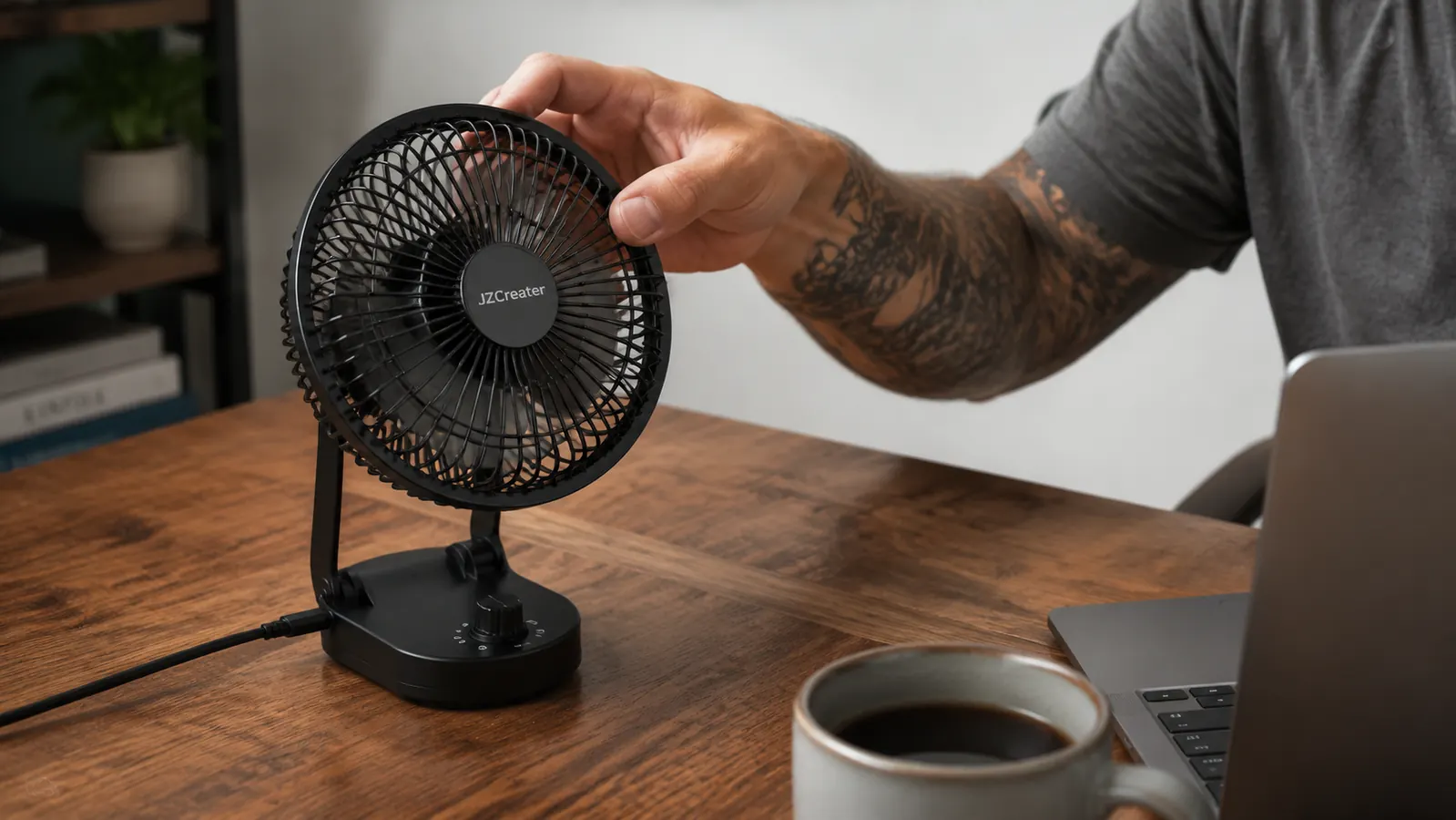
You get one fan unit, a USB-A to micro-USB style cable for power, and that's it, no separate wall adapter included, though it'll run fine off any USB port or a standard phone charger brick. The body is black plastic, small enough to fit in one hand, with a rotating head on a fixed stand that tilts. There's a three-speed toggle switch on the back, simple, no digital display, no remote, no app. For a fan at this price, that's the right call. Nothing here to break because there's barely anything here to begin with. I did add a small adhesive cable clip to keep the power cord from dragging across the desk every time I adjust the tilt, a two dollar fix that made the whole setup feel more intentional instead of like a fan I'd just plopped down.
The blades are small, maybe three inches across, tucked behind a plastic safety grille with gaps wide enough that a curious finger could still get close, so it's not something I'd leave running unattended around a toddler or a very determined cat. Mine has survived six months of daily on-off cycling, a couple of accidental knocks off the desk edge onto a carpeted floor, and one drop onto concrete in my garage that I was sure would crack the base. It didn't. There's a hairline scuff on the plastic where it hit, but it still runs on all three speeds exactly like day one.
Noise Levels Across All Three Speeds I've also started keeping it on low by default anytime I'm recording a short video for a client, since even that faint hum is enough to show up if the mic is close and the room is otherwise silent. It's a habit that took maybe two weeks to build and now I don't even think about it.
This is the thing I get asked about most when people see it on my desk during video calls. Low speed is close to silent, I genuinely have to put my hand near the grille sometimes to confirm it's running when things get quiet. Medium introduces a soft, steady hum, noticeable if the room is otherwise dead quiet but easily covered by a podcast or a call with more than one person talking. High is where it gets honest. There's a real whir at top speed, not obnoxious, but it will show up faintly on a sensitive microphone if you're recording anything close to the fan. I learned that the hard way during a client screen-share in March when someone asked what the humming noise was, and I had to admit it was my desk fan on high.
Since then, my habit on calls is to drop it to medium or low a minute before I start talking, then bump it back up once the call ends. It's a small workaround but it's become automatic at this point, barely a conscious decision anymore. I've also noticed the fan pulls in a fair amount of dust given how open the garage is to the outside air, so I wipe down the grille and the blades with a dry cloth about once a month. Takes thirty seconds and keeps the airflow from getting weaker over time, which is the kind of maintenance step nobody mentions in the product listing but that any garage-office setup is going to need eventually.
Performance Through a Garage That Swings 50 Degrees
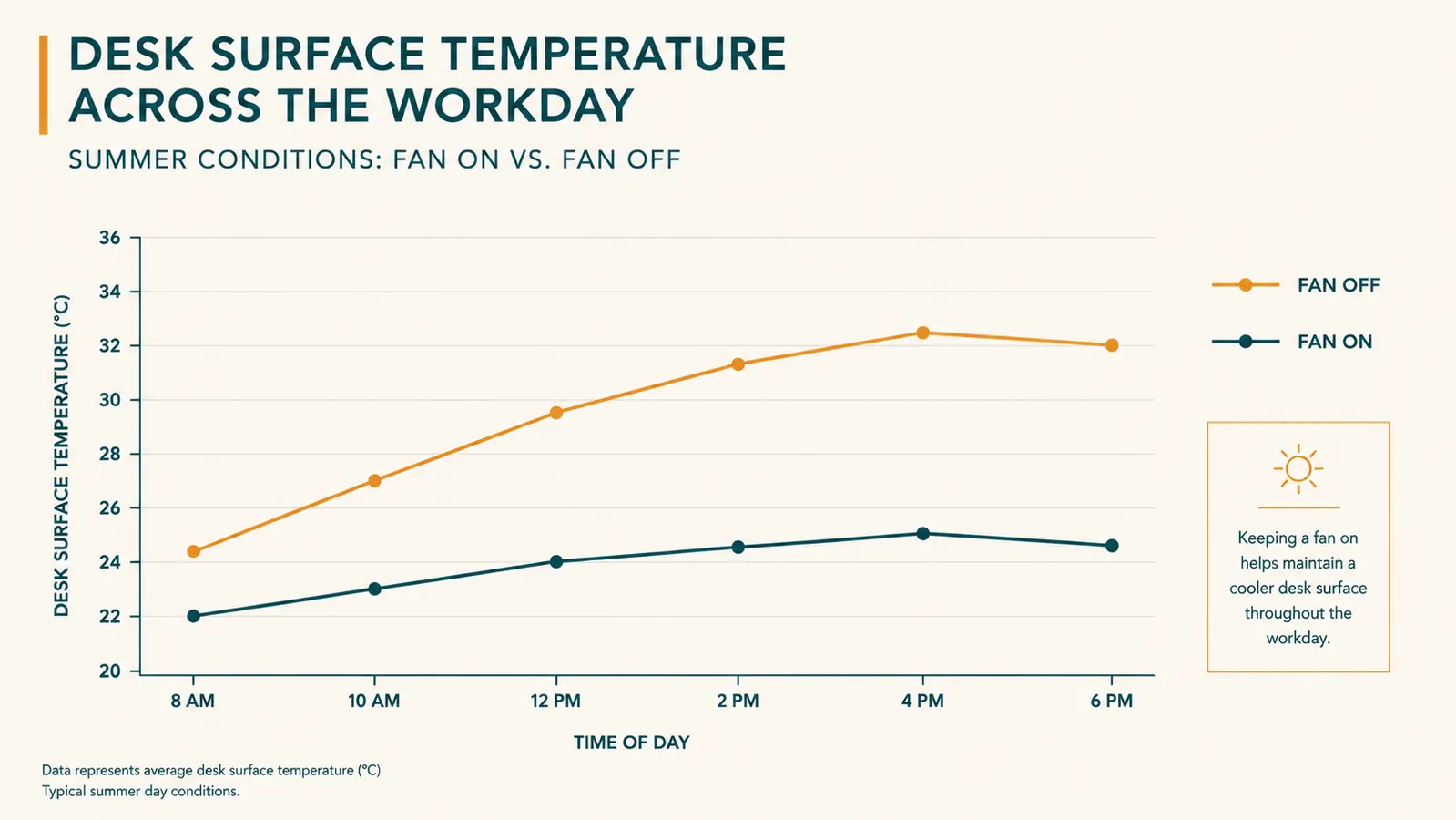
My garage office isn't insulated the way a spare bedroom would be. January mornings out there sit in the mid-40s before the space heater catches up, and by late June and into July, afternoons have pushed past 90 more than a few times with the door down. That's a rough environment to ask a ten dollar fan to perform in every single day, and I half expected the motor to start struggling or the plastic housing to warp somewhere around month three, especially once real summer heat set in.
I also briefly looked at a rechargeable, battery-powered version of a similar small fan, thinking it might be handy to move around the house or take outside if I ever worked from the porch. The battery life on the ones I researched topped out around four to six hours on medium, which would have meant charging it daily if I actually used it as my main desk fan, and battery-powered units in that price range tended to run noticeably weaker on high speed compared to a wall or USB powered fan. Since I'm parked at the same desk for eight-plus hours a day anyway, a wired fan made more sense than something built for portability I wasn't going to use.
It hasn't. The fan that ran fine in a 45 degree garage in January runs exactly the same in a 92 degree garage in July. No motor whine that wasn't there before, no plastic warping near the grille even on the hottest afternoons when I've got it running on high for hours at a stretch. The one thing I will flag is that on the worst days, direct airflow from a small personal fan only does so much. It keeps my face and hands comfortable, but it is not lowering the actual air temperature in the room, and there were a handful of afternoons in late June where I gave up and moved my laptop to the kitchen table for a few hours because no amount of fan airflow was going to make 95 degrees pleasant.
Who I Considered and Rejected Before Landing Here
Before grabbing the JZCreater, I looked at a couple of clip-on fans that attach to the edge of a desk or monitor, and one slightly larger tower-style desktop fan that ran closer to twenty five dollars. The clip-on style was appealing because it frees up desk surface, but the ones I found had weaker motors for a similar price and reviews mentioning the clip mechanism loosening over time, which sounded like exactly the kind of failure point I didn't want six months into daily use. The tower fan moved more air and looked nicer, but it also took up real desk footprint I didn't have to spare next to my monitor arm and keyboard tray, and for a personal comfort fan aimed at one person sitting in one spot, that extra size wasn't buying me much. The small footprint and the direct USB power were what tipped it toward the JZCreater, and six months in I still think that was the right call for a desk this size.

The One Thing I'd Change
If I could change one thing, it'd be the cable length. The included cable is short enough that I need to run it to a nearby USB hub rather than routing it all the way back to a wall outlet or my computer's rear ports, which are both farther from where the fan sits. I ended up buying a three dollar USB extension cable in February just to give myself more placement flexibility, and that's been the fix. It's a minor gripe for a product this cheap, but it's the one thing that kept it from being a completely frictionless setup out of the box. If JZCreater ever revises this model, even an extra foot and a half of cord would remove the one step I had to solve myself out of the box.
What I Liked
- Runs quiet enough on low and medium to keep behind you during video calls
- Held up through a 50 degree seasonal swing with no motor issues or warping
- Survived an accidental drop onto concrete with only a cosmetic scuff
- Tilts and rotates enough to aim airflow exactly where you need it
- USB powered, works off a laptop port, hub, or standard phone charger
- Extremely low price for something that's earned daily use for six months straight
Where It Falls Short
- High speed hum is audible on sensitive microphones during calls or recordings
- Included USB cable is short, budget an extension cable if your outlet is far
- Small blades mean it cools you personally, not the room
- Safety grille gaps are wide enough that curious fingers or paws should stay clear
- No remote or app, just a manual three-speed toggle on the back
It's not cooling my garage. It's cooling me, and after six months that's turned out to be exactly what I needed.
Who This Is For
If you work from a room without reliable air conditioning, a converted garage like mine, an attic bedroom, a sunroom, or just an office that the central air never quite reaches, this is a cheap, easy fix for personal comfort during the hours you're actually sitting at the desk. It's also a solid pick for anyone whose office runs warm from equipment heat, multiple monitors, a desktop tower, a printer all crammed into one small room can push the temperature up a few degrees on their own. And if you're the type who runs cold at your own desk while everyone else in the house wants the thermostat higher, having your own personal airflow source solves that argument without anyone else having to compromise. It's also a genuinely good fit for anyone who shares a house with people who run the thermostat colder or warmer than they'd like. Instead of fighting over the central setting, you just point a little airflow at your own chair and let everyone else keep the room temperature they want.
Who Should Skip It
If you're trying to actually cool down a whole room, this isn't that tool, you'll want a real tower fan, a window unit, or portable AC instead. It's also not the right pick if you record audio professionally or take calls where even a faint background hum is a problem, since high speed will pick up on a sensitive mic. And if you've got small kids or pets who like to poke at things on a desk, keep in mind the blade grille has real gaps in it, it's not something I'd trust unsupervised around a curious toddler or an especially determined cat that likes knocking things around. And if you need something that can run cordless away from an outlet, this isn't built for that either, it's a wired fan through and through, meant to live in one spot on a desk within reach of a USB port.
Six months of daily heat, drops, and calls later, it's still doing exactly what a ten dollar fan should do.
If your desk turns into a sauna every afternoon and central air isn't reaching your setup, this is the cheapest real fix I've tested this year.
Amazon Check Today's Price on Amazon →