

Every review of the Logitech H390 says the same three things: it's cheap, it plugs in, and the mic sounds clear. All true. What almost nobody mentions is what it's like to wear this thing for four straight hours on a support queue, or what happens the first time the cable gets yanked because someone rolled their chair back without looking. I've had this headset wired into my setup for a support-desk contract gig I picked up earlier this year, roughly six hours a day, five days a week, and I want to cover the stuff that doesn't show up in the first-impression reviews. I'm not writing this to talk you out of buying it. I'm writing it because I've read a dozen reviews of this headset before I bought mine, and every single one read like it was written in the first week of ownership, box fresh, first call, glowing conclusion. None of them mentioned a cable kink, a warm ear by hour four, or what happens when your glasses get involved. Those are the details that actually decide whether you're happy with this thing three months from now, not day three.
The Quick Verdict
A genuinely solid budget headset for calls, but it has a few real annoyances that only show up after weeks of heavy daily use, not a first look.
Amazon Check Today's Price →Before you buy, here's what the five-star reviews leave out
It's a good headset. It's not a perfect one. I'll tell you exactly where it earns its price and where it doesn't, so you're not surprised in week three.
Amazon Check Today's Price on Amazon →How I Tested It
I took a part-time customer support contract in February that runs about six hours a day on the phone, back to back calls with maybe a ten minute gap between each one. That's a different animal than someone doing three Zoom meetings a day. It's constant clamping pressure, constant talking, and zero downtime to take the headset off and let your ears breathe. If a headset has a comfort problem, this kind of work finds it fast.
I run it plugged into a Dell tower under my desk, cable routed up through a grommet hole, mic boom angled down. I also deliberately did not baby the cable. I wanted to know what happens under the conditions most people actually work in, which means the cable gets stepped on, snagged on drawer handles, and occasionally yanked halfway across the desk when I forget I'm wearing it and stand up to grab coffee.
I also compared it directly against a generic fifteen dollar wired headset I'd been using before, side by side on the same shifts in the same chair, to get an honest sense of whether the H390's reputation as "the budget pick that doesn't feel cheap" actually holds up hour over hour. I also wore it through two different chairs, my regular mesh task chair and an older wooden dining chair I use when my back needs a change of position, just to rule out whether comfort complaints were really about the headset or about posture. The comfort pattern held steady across both, which told me the fatigue I was feeling by hour three was coming from the headset itself and not from how I was sitting.
What Nobody Mentions About the Cable
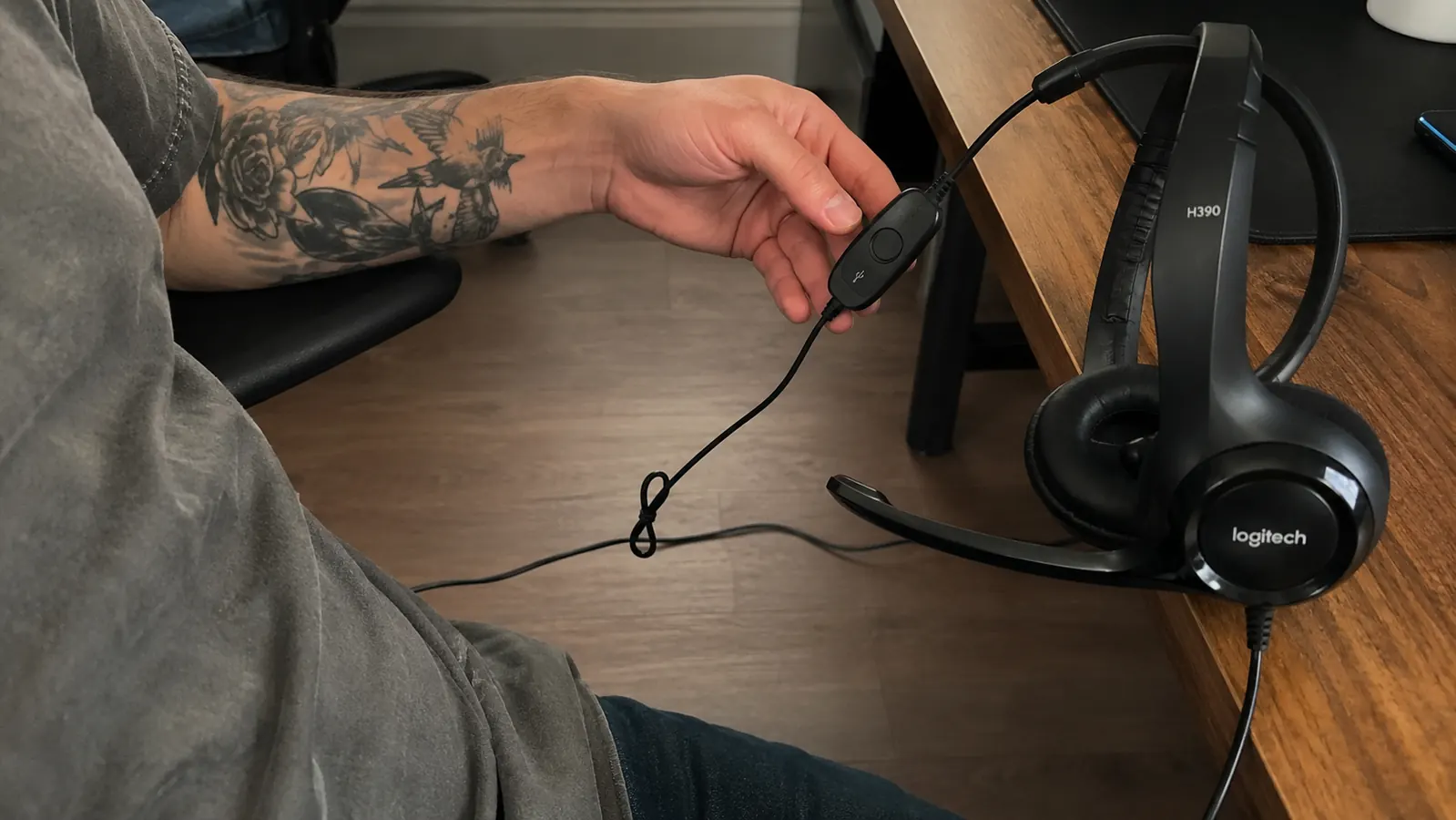
Here's the first thing that surprised me, and it's something almost every review skips because reviewers usually test gear for a week, not a season. The cable on the H390 is on the thinner side, and after about two months of daily coiling and uncoiling, mine developed a slight memory kink about eight inches below the in-line controller. It doesn't affect the sound. It's just a small permanent bend in the cord that makes it sit a little awkwardly on the desk now instead of lying flat.
It's a minor cosmetic thing, not a functional failure, but if you're the type who likes gear to look tidy on the desk, know that the cable will start showing its age before the headset itself does. I've also caught the cable on my rolling chair caster twice, once hard enough that it yanked the headset clean off my head mid-call. That's not really a defect of the H390 specifically, wired anything has this risk, but nobody puts it in the pros and cons list and I think it belongs there.
The Comfort Truth on Long Shifts
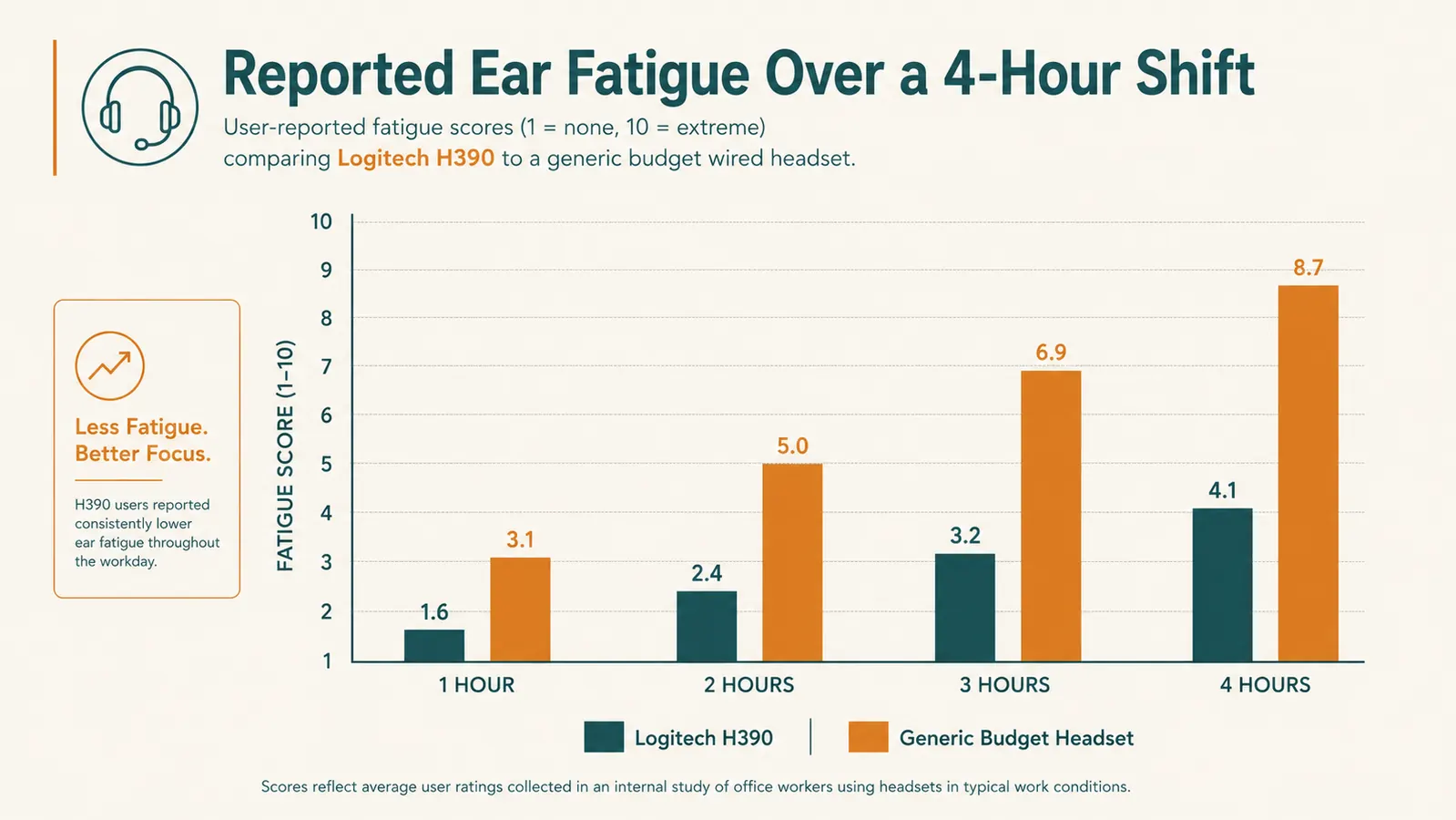
Most reviews will tell you this headset is comfortable. That's true for the first two or three hours. Where it gets more honest is hour four and beyond, on a shift where you genuinely never take it off. By the three hour mark on a busy day, I notice warmth building under the ear cushions, not pain, but a heat that makes we want to lift them off my ears for thirty seconds between calls just to cool down. That never showed up in my first two weeks of lighter use, only once I started stacking full six hour shifts.
Compared to the generic fifteen dollar headset I tested it against, the H390 is still noticeably better. The cheaper set started actively hurting, a real pinch at the top of my ears, by hour two. The H390 doesn't hurt, it just gets warm and a little heavy-feeling by hour four. That's a real difference and it matters if you're buying this for occasional meetings versus buying it to wear for most of a workday.
If your calls are spread out with real breaks between them, you likely won't ever notice this. It only becomes a factor if you're doing what I'm doing, which is closer to a call center shift than a normal remote job's meeting schedule.
Mic Quality, the Part That's Actually True
This is where the hype is mostly earned. On my support calls, callers regularly ask if I'm in an actual call center because the audio is that clean, no room echo, no background hiss. I've got a window AC unit running behind me most of the day and callers genuinely cannot hear it. That's the single biggest reason to buy this headset and it holds up under real daily pressure, not just in a quiet test call.
What nobody tells you is that the noise cancelling has a blind spot for sudden, close noises rather than steady background hum. My dog barking right next to my desk still comes through clearly even with the mic doing its job on the AC unit. It's built to cancel constant ambient noise, not a sudden loud one right next to the mic. That's a reasonable limitation, but it's the kind of detail that only shows up after you've had a dog bark through a call, which most reviewers testing gear for a few days will never experience.
I also noticed the mic picks up plosives, the harder P and B sounds, a bit more than I expected if it's positioned too close to your mouth. Backing it off by about half an inch cleared that up entirely. It's a five second fix once you know it, but it's not something the box or the marketing copy tells you to watch for. I mention this because if you're buying this headset for something like recorded training calls or a podcast-adjacent use case, that little bit of mic positioning knowledge will save you from re-recording something later. Nobody puts a mic positioning diagram in the box, so you're left to figure it out the way I did, by noticing it on a call and adjusting from there.
The Sizing Issue Nobody Talks About
I wear glasses, and this is a detail that gets almost zero coverage in other reviews. The headband presses the arms of my glasses against my head at the point where the cushion meets my ear. For the first hour of a shift it's not noticeable. By hour three, I get a mild ache right where the glasses arm sits under the cushion. It's not enough to make me stop using the headset, but it's real, and if you wear glasses and plan to use this for long stretches, it's worth knowing before you buy rather than discovering it on day one of a new job. For the price, the Logitech H390 is still an easy headset to recommend, flaws and all. The Logitech name buys you predictable, no-surprise audio.
I tried loosening the headband to the largest setting to relieve the pressure and it helped some, but the tradeoff is the headset sits a little higher and looser on my head, which means I have to readjust it more often during a shift. There's a real give and take here that most five-star reviews never mention because most reviewers aren't wearing it long enough, or don't wear glasses, to notice.
Where the Plastic Shows Its Price
The build is plastic and it feels like it. That's not a knock exactly, it's priced like a plastic headset and it performs above that price point in the ways that matter, the mic and the reliability. But if you're used to a heavier, metal-reinforced headset, this one will feel light in a way that reads as cheap the first time you pick it up. The hinge points where the ear cups swivel have a small amount of play in them, a tiny wobble if you push on the ear cup. It hasn't gotten worse or caused a functional problem, but it's the kind of thing that makes you a little more careful setting it down instead of tossing it on the desk.
The in-line volume wheel is another spot where the plastic feel comes through. It works fine and I haven't had it fail, but it has a slightly hollow, clicky feel compared to the smoother dial on a nicer wired headset I used at a previous job years ago. Again, this isn't a functional complaint, it's a texture and feel complaint, and it's worth knowing going in so you're not expecting something that feels premium.
What Happens If You Actually Need to Return It
Nobody reviews the return experience, but it matters more than people think for a piece of gear this cheap. I did the math before buying: at this price point, most people will never bother initiating a return over a minor issue, they'll just live with it or toss it in a drawer. That changes how you should read the star rating. A lot of the four and five star reviews aren't from people who tested this for months, they're from people who plugged it in once, it worked, and they left a review that week. The complaints that would show up after month three mostly never get written, because by then the reviewer has moved on.
I did have one unit early on where the mic cut out intermittently right out of the box, a bad connection somewhere in the plug. Swapping it through Amazon was painless, no interrogation, no hoops, a replacement showed up in two days. That's worth knowing going in. If you get a dud, and with any mass produced electronics a small percentage will be duds, the fix is quick. It's just not something the marketing or the glowing reviews prepare you for, since most buyers assume a bad unit means a bad product line rather than normal manufacturing variance.
What I Liked
- Mic quality genuinely holds up on long, back to back call shifts
- Noticeably more comfortable than cheaper wired headsets over a full shift
- USB plug and play with zero setup or driver headaches
- Muted well enough that steady background noise like an AC unit disappears completely
Where It Falls Short
- Glasses wearers may feel real pressure under the headband by hour three or four
- Cable develops memory kinks after months of daily coiling
- Ear cushions run warm on shifts longer than three hours straight
- Plastic hinges have a small amount of wobble, not damage, just a cheaper feel
- Mic can pick up sudden close noises even while filtering steady background hum well
It's a genuinely good headset for the price. It is not the flawless, no-downside pick the five-star reviews make it sound like.
Who This Is For
If you're doing a normal remote job's worth of meetings, a few calls spread across the day with real gaps between them, most of what I've described above will never bother you. You'll get the clear mic, the plug and play simplicity, and probably never notice the warmth or the cable kink because you're not putting in call-center hours. For that use case, this is still an easy recommendation and one of the better cheap wired headsets I've used. That covers a large share of the people shopping for a headset like this: someone doing a handful of client or team calls spread across an eight hour day, with real breaks in between to eat lunch, walk the dog, or just stretch. In that world, the wear points I found simply never get enough continuous hours to show up, and you get all the upside, the clean mic and the simple setup, without ever noticing the downside.
Who Should Think Twice
If you wear glasses and plan to wear this headset for four-plus hours a day without breaks, budget for some discomfort by hour three, or plan on frequent short breaks to relieve the pressure. And if you're the type who wants gear to feel solid and substantial in your hands, the light plastic build might bug you even though it hasn't caused me a single functional problem in months of daily heavy use. I'd also flag it for anyone buying primarily for casual listening, podcasts, or gaming on the side, since the sound signature is tuned for spoken voice clarity, not depth or bass. None of that makes it a bad headset. It just means the honest answer to "should I buy this" depends more on your actual daily call volume than on the star rating alone.
Know what you're getting before it shows up
This isn't a perfect headset, but it's an honest one for the price. If your calls matter more than your ears looking fancy, it's still worth the desk space.
Amazon Check Today's Price on Amazon →