
I want to get one thing out of the way before I talk about anything else. The APC BE600M1 is a good little battery backup. I still use mine. But if you go read the glowing five-star reviews and nothing else, you're going to be surprised by a few things in your first month that nobody bothers mentioning, and that's really what this piece is for.
I did electrical work for a living before a shoulder injury moved me to a desk, so when I say I've handled my share of backup power gear, I mean actual panels and actual load calculations, not just Amazon reviews. The BE600M1 has been sitting under my desk in Ohio since last October, and it's been through three real outages, a rolling brownout during a July heat wave, and I've opened the case twice. Here's the stuff that isn't in the bullet points on the product page, the parts that only show up once you've actually lived with it day to day.
The Quick Verdict
Solid, honest protection for router and monitor level loads. The beeping and the battery replacement cost are the two things that will annoy you if nobody warns you first.
Amazon Check Today's Price →Before your next storm knocks your modem out for six hours, here's the fix
Check today's price on the APC BE600M1 and see if it's in stock at your size.
Amazon Check Today's Price on Amazon →The Beeping. Let's Talk About the Beeping.
This is the number one thing people don't warn you about, and it's the number one thing that generates confused one-star reviews online. When the power drops and the BE600M1 switches to battery, it beeps. Not once. It beeps every few seconds, the whole time you're on battery power. If your power blips at 11 p.m. and comes back in ten seconds, fine, you get one short beep sequence and it's over. But if you have a real outage, like the four-hour one I had in January, that unit is beeping in a dark house the entire time unless you find the mute button.
There is a mute button. It's the same button you use to test the unit, and you have to hold it down for about a second, not tap it, or nothing happens. I didn't know this the first time and stood there in a dark hallway pressing it like I was mashing a broken elevator button. Once you know it's a press-and-hold, it's a non-issue. But that first outage, at 11 p.m., with my dog barking at the noise, was not the introduction I wanted.
There's a second kind of beep too, a single chirp every few minutes, that means the battery is getting old and can't hold a full charge anymore. APC calls this a replace battery warning. It sounds almost identical to the low battery warning during an actual outage, so the first time mine chirped I assumed the power had gone out somewhere in the house wiring. It hadn't. The battery was just three and a half years old at that point and starting to fade. More on that below.
One more beep pattern worth knowing before it catches you off guard, an overload warning, is a rapid continuous tone that sounds urgent because it is. It means you've plugged in more load than the unit can carry, usually because someone tried running a space heater or a printer off the battery-backed outlets. The fix is immediate, unplug something, not troubleshoot the unit itself.
What It Actually Runs, in Minutes, Not Marketing Copy
APC lists this unit at 600VA and 330 watts, and the box has a chart, but charts on boxes are optimistic. I plugged a kill-a-watt meter in between my gear and the UPS to see real numbers instead of guessing.
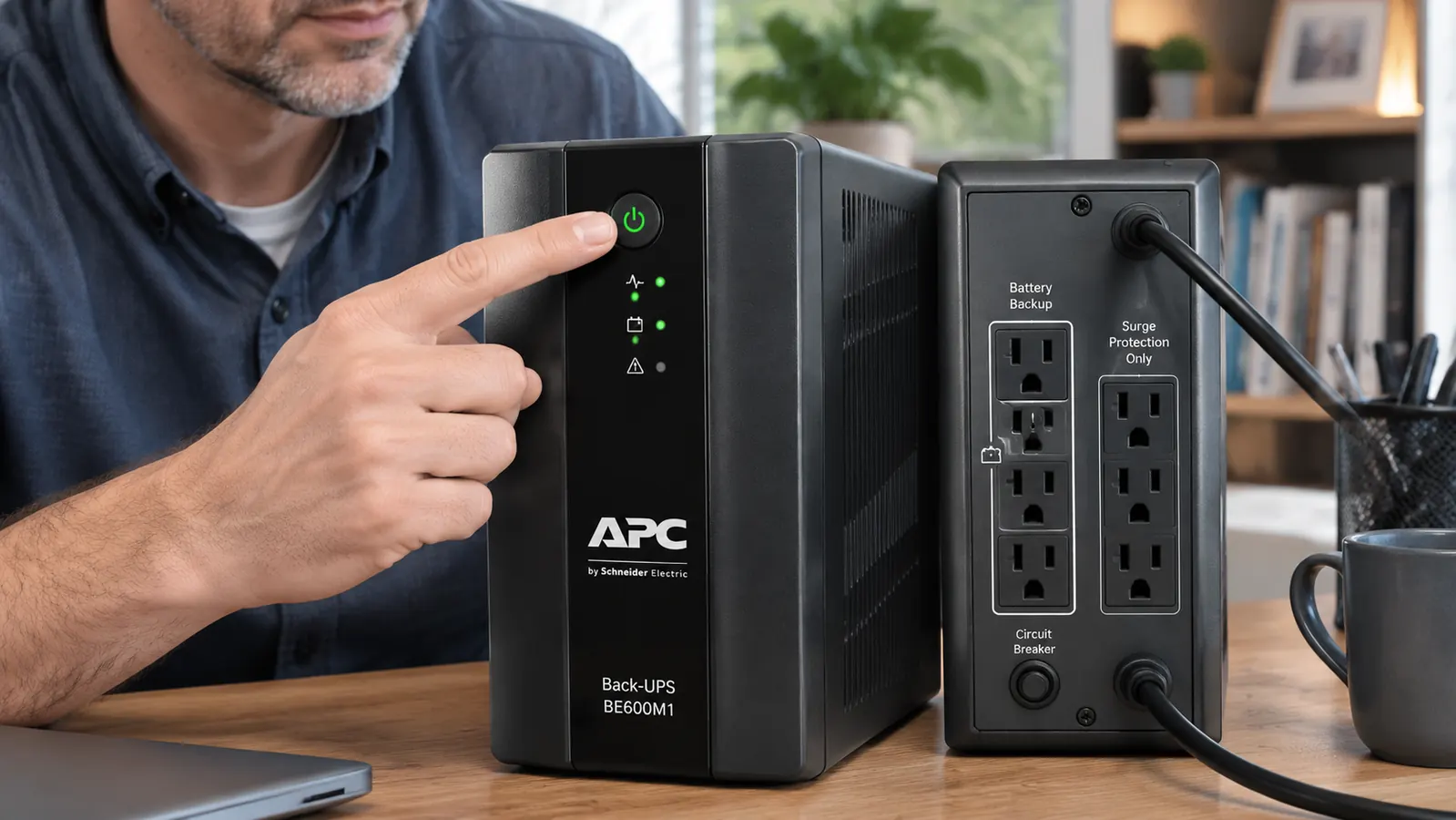
With just my cable modem and router on it, pulling about 18 watts combined, I got just over 40 minutes of runtime before the unit shut itself off to protect the battery. That's genuinely useful. It covers the vast majority of outages in my area, which almost never run longer than 20 minutes.
With a single 27 inch monitor added, pulling around 35 watts on its own, runtime dropped to about 25 minutes. Add my actual desktop tower, an older mid-range build pulling 90 to 110 watts under load, and the whole rig together gave me right around 8 minutes before shutdown. Eight minutes is enough to save a document and close your work cleanly. It is not enough to keep working through a long outage, and if you're picturing yourself finishing a video call on battery power with your full desktop running, that's not the setup this unit is built for.
The math that matters here is watts, not the VA number printed in bold on the front of the box. VA is close to a best-case number assuming perfect power factor, and real desktop power supplies rarely hit that. If you want an honest estimate before you buy, add up the actual watt draw of everything you plan to plug into the battery-backed outlets specifically, not the whole desk, and expect somewhere between a third and half of the box's advertised runtime once you're at typical desktop loads rather than just a router.
Setup Was Easy. The Cover Design Is Not.
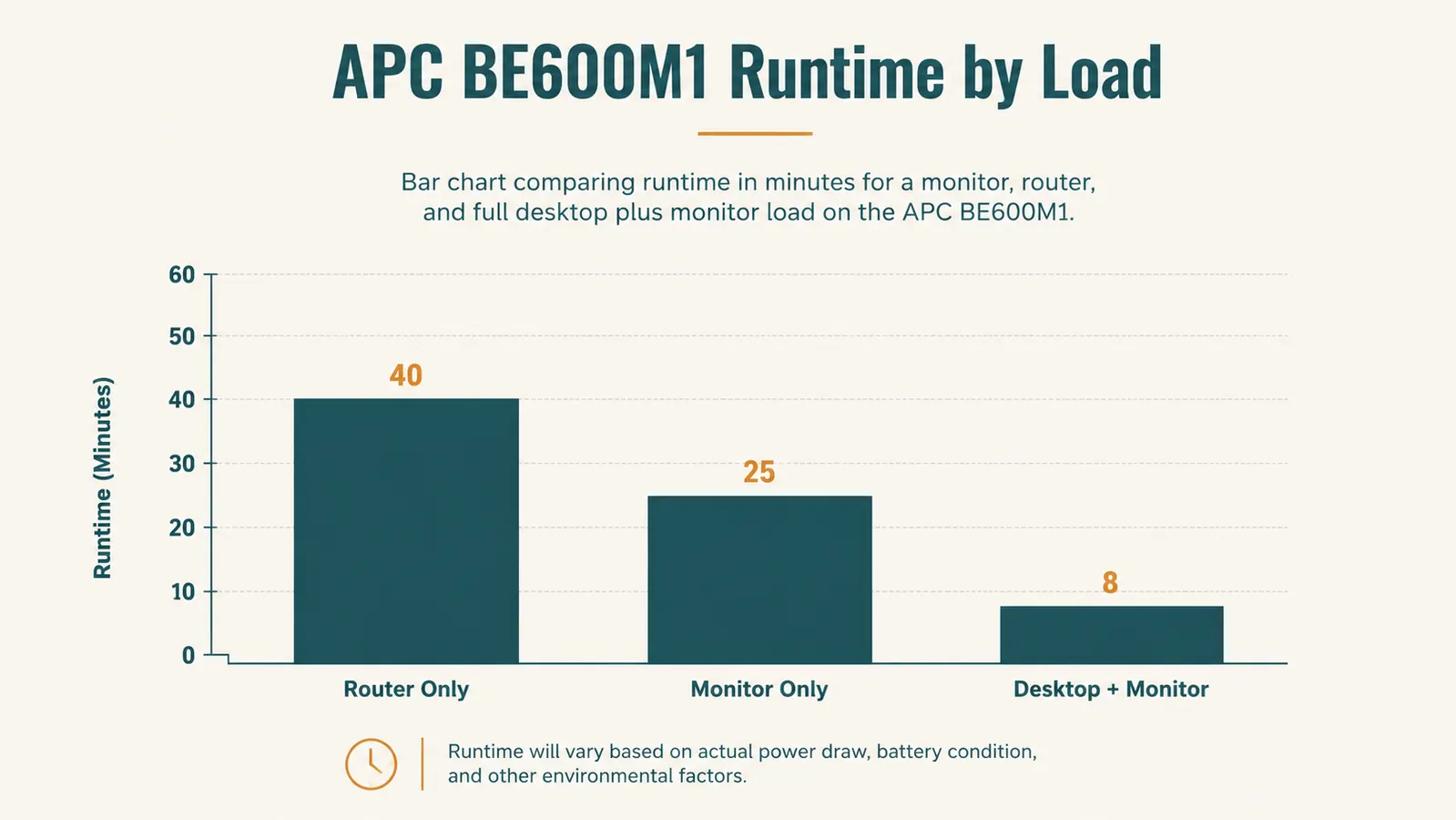
Plugging it in took two minutes. Six outlets on the back, three battery-backed and surge-protected, three surge-protected only. The labeling is printed right on the case so you're not guessing which is which, which I appreciated. I put the modem, router, and monitor on battery power and the desk lamp and phone charger on surge-only, since those don't need to survive an outage.
What nobody mentions is the plastic cover over the outlet bank. It's there to keep dust out and it looks clean, but it makes plugging in anything with a bulky wall wart transformer a genuine wrestling match. My router's power brick is oversized and it physically will not fit under the cover flap in two of the six slots. I ended up leaving the cover permanently propped open on one side with a folded index card, which defeats the point of having a cover at all. If you have a desk full of oversized chargers and power bricks, test the fit before you assume it'll close flush.
The Fan Noise Nobody Warns You About
Under normal operation, plugged into wall power with no load stress, this unit is silent. I want to be clear about that because some reviews make it sound like it hums constantly. It doesn't. But when it's running on battery, or when it's under a heavier load like my full desktop, there's a small internal fan that kicks on, and it's audible in a quiet room. Not loud, more like a slow ceiling fan on its lowest setting, but if your desk is in a bedroom and the power goes out at 2 a.m., you will hear it. My office is detached from the bedrooms so it's never bothered me, but a reader with a studio apartment setup should know this before assuming total silence.
Weight and footprint
It's heavier than it looks, close to nine pounds, almost all of it battery. It's roughly the size of a large hardcover book standing on end. Mine sits flat under the desk against the wall, tucked behind a cable organizer tray, and it's genuinely out of sight once it's positioned. If you're tight on space, measure your under-desk clearance first, some compact desks with a center drawer leave less room than you'd think.
The status lights are more useful than they look
There are three small LEDs on the front, power, battery, and overload, and I ignored them for the first month because I assumed they were just an on-off indicator. They're not. The battery LED shifts pattern depending on charge level, and watching it for a week taught me more about my home's actual power quality than I expected. My power flickers, brief under-a-second dips, more often than I realized, the unit switches to battery so fast the lights barely blink but the log of it is there if you pay attention. If your power is dirtier than you think, this thing quietly proves it, which is information you don't get from a plain surge strip.
What I Liked
- Real, measured runtime that covers the vast majority of short outages
- Clean labeling on the outlets so you're not guessing which plugs are protected
- Silent under normal wall power, only audible fan noise during battery mode or heavy load
- Mute button exists and works once you know it's a press-and-hold, not a tap
- Status lights give a genuinely useful at-a-glance read on load and battery health
Where It Falls Short
- Alarm beeping during a real outage is loud and constant until you find the mute
- Outlet cover doesn't close over oversized power brick transformers
- Runtime drops fast once a full desktop tower is added to the load
- Replacement battery is a real recurring cost every 3 to 5 years, not a one-time purchase
- Replace-battery chirp is easy to confuse with an actual outage warning the first time you hear it
This isn't a unit that lies to you about what it can do. It's a unit that assumes you already know how UPS math works, and doesn't explain itself.
The Battery Replacement Cost Nobody Mentions Up Front
Every UPS with a sealed lead-acid battery has a lifespan, and APC is upfront about it in the manual, which almost nobody reads. Expect 3 to 5 years of useful battery life depending on how many outages and how much heat the unit sits in. Mine started chirping its replace-battery warning at three years and seven months, which is right in line with what APC states.
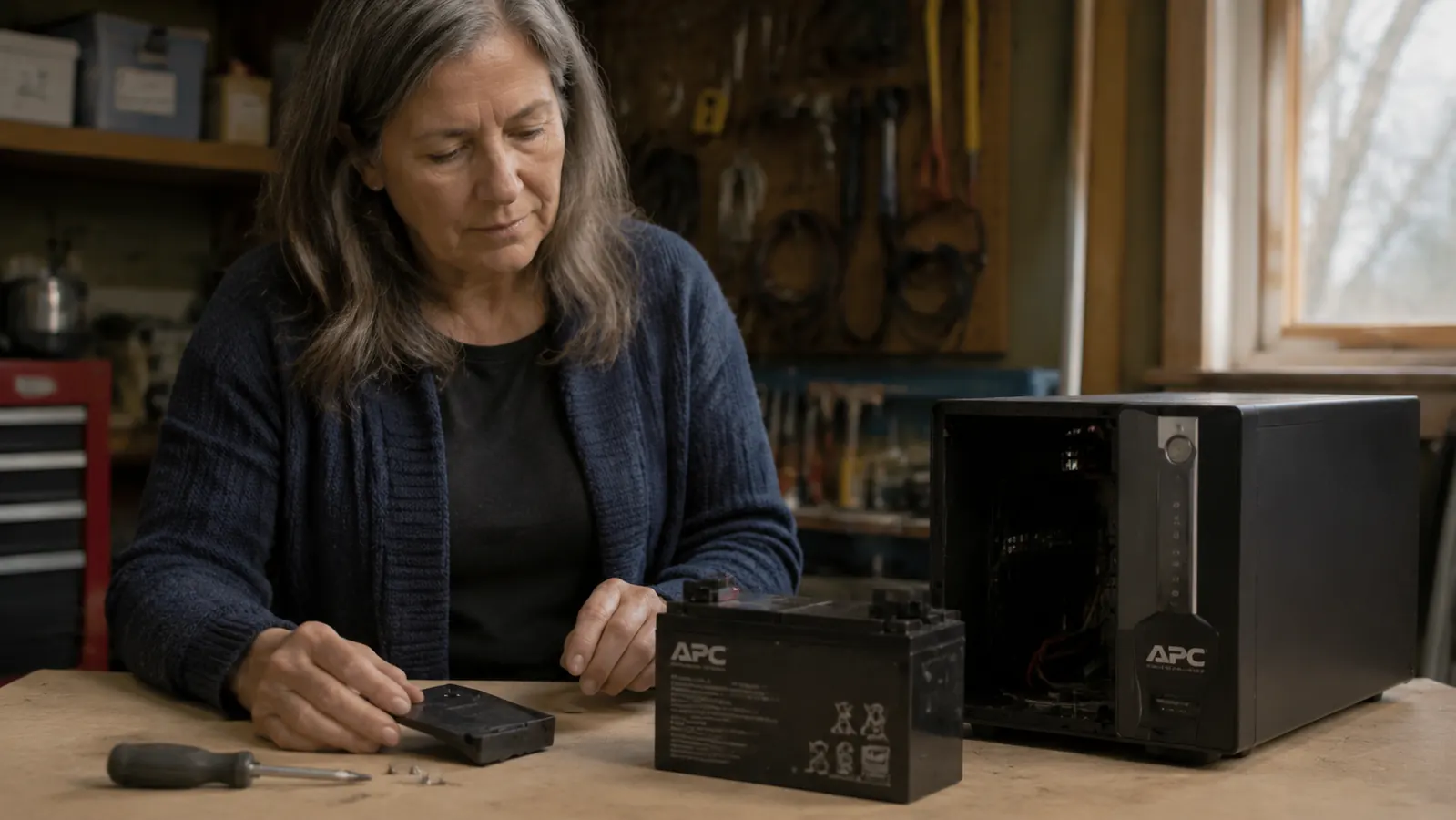
The replacement battery cartridge, APC's own RBC branded cartridge for this model, runs in the same ballpark as a mid-range power strip, not free, and not something the initial purchase price prepares you for mentally. Swapping it took me about ten minutes with a Phillips screwdriver, no soldering, just a battery connector and two screws on the back panel. If you're comfortable doing basic work around a fuse box, this is well within your ability. If the idea of opening any electrical device makes you nervous, budget for either paying someone or just replacing the whole unit when the time comes.
Heat matters more than people expect here. My unit sits in a garage-converted office that runs warmer in summer, and I'd bet that shaved months off the battery's life compared to a climate-controlled bedroom office. If you can keep it somewhere that doesn't regularly hit 85 degrees or hotter, you'll likely get closer to the 5-year end of that range than the 3-year end.
What I'd Have Checked Before Buying, Looking Back
If I could go back and hand myself one piece of advice before I bought this, it would be to actually total up the wattage of everything I planned to protect first, instead of assuming any UPS labeled for home office use would automatically cover a full desktop setup. I bought based on the brand name and the price point, not the math, and got lucky that my real needs, router, modem, one monitor, lined up close enough to what this unit handles well.
I'd have also asked myself honestly whether I needed pure sine wave output or if simulated sine wave, which is what this model provides, was good enough. For a router, monitor, and standard desktop power supply, simulated sine wave has never caused me a problem. If you're running specialized medical equipment or certain older laser printers that are picky about power quality, that's a different conversation, and worth a call to the manufacturer of that specific gear before assuming any budget UPS will play nice with it.
Where I've Seen It Fall Short
I don't think this unit is trying to be more than it is, but I've seen buyers expect it to be a whole-office solution and get frustrated. It will not run a printer for any meaningful time, the surge draw when a laser printer heats its fuser can trip the overload protection entirely. It will not power a second monitor plus a desktop for more than a couple of minutes. And it does nothing for a modem or router that's already lost its upstream internet connection somewhere down the line, it only keeps your gear powered, not your ISP's infrastructure running.
I've also seen people place it somewhere enclosed, inside a cabinet with the door shut, and then wonder why the fan runs more and the unit runs warmer than expected. It needs airflow around it like any electronics with an internal fan. Don't bury it.
Who This Is For
If you work from home and your biggest fear during a power blip is losing internet and having to explain a dropped video call, this covers you well. If you live somewhere with frequent short outages, the kind that last 5 to 20 minutes, this is close to ideal, giving you enough runtime on router, modem, and a monitor to either keep working through it or save your work and shut down cleanly. It's also a smart, cheap insurance policy against surge damage even outside of outages, since brownouts and dirty power from a shared circuit can degrade equipment over years without you noticing.
Who Should Skip It
If you're trying to keep a full gaming or workstation desktop plus multiple monitors running through extended outages, this model doesn't have the capacity, look at APC's higher VA models instead, they cost more but the runtime math actually supports that use case. If loud beeping in a quiet bedroom-adjacent space is a dealbreaker for you regardless of the mute function, or if you're not willing to budget for a battery swap every few years, it's worth knowing that going in rather than being annoyed by it later.
It won't run everything, but it'll run what matters when the power drops
See current availability and pricing for the APC BE600M1 on Amazon.
Amazon Check Today's Price on Amazon →